



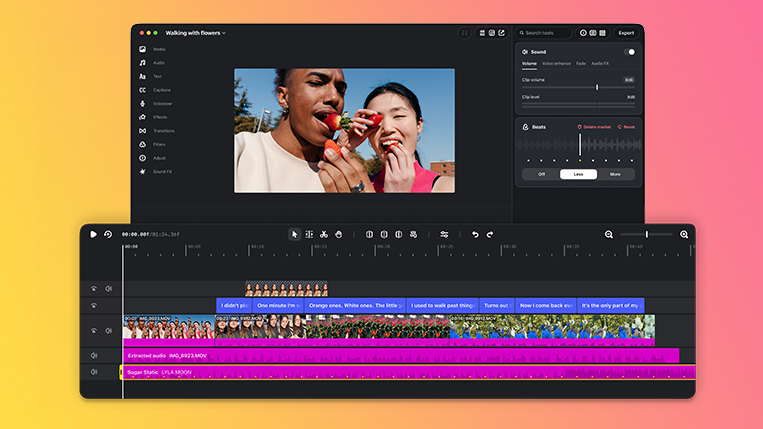
Instagram’s video editing app, Edits, is expanding beyond mobile, with a desktop version now available to download on Mac devices.
The move gives creators more room to work on their videos, with a wider editing setup, additional creative controls, and tools designed to make producing content easier.
The Mac version carries over several features from the mobile app, including access to music, sound effects, video effects, and automatic captions.
Creators can also pick up where they left off, with saved audio and text styles from their phone available on desktop.
Here are some of the other features worth knowing about:
What’s included?
- Multi-track timeline: Work with several video clips and audio tracks at once, making it easier to arrange footage, music, and sound.
- Keyframe controls: Add movement and create smoother transitions by controlling how elements change throughout a video.
- Audio waveforms: See the sound patterns in your clips to line up cuts with music beats and specific sounds.
- Easier clip editing: Split, cut, and trim footage with greater control when putting a video together.
- Colour grading tools: Adjust colours, brightness, and visual tones using colour wheels, curves, and log conversion tools to give footage a more polished finish.
- Custom fonts and LUTs: Import your own font files and colour presets (LUTs) to keep videos consistent with your personal style or brand.
- AI agent support: Connect AI agents through MCP, allowing compatible tools to assist with editing projects.
Export and share directly
Creators can publish videos straight from the Mac app to Instagram without transferring finished files to their phones. The desktop version also supports features such as tagging, location details, and Trial Reels.
Videos can be exported in horizontal or vertical formats at 4K resolution with no watermark, making it easier to prepare content for different platforms.